Ask Secure Desk a question. Answers come from this site's docs only. I will cite a page. I will not invent a product claim.
How it works
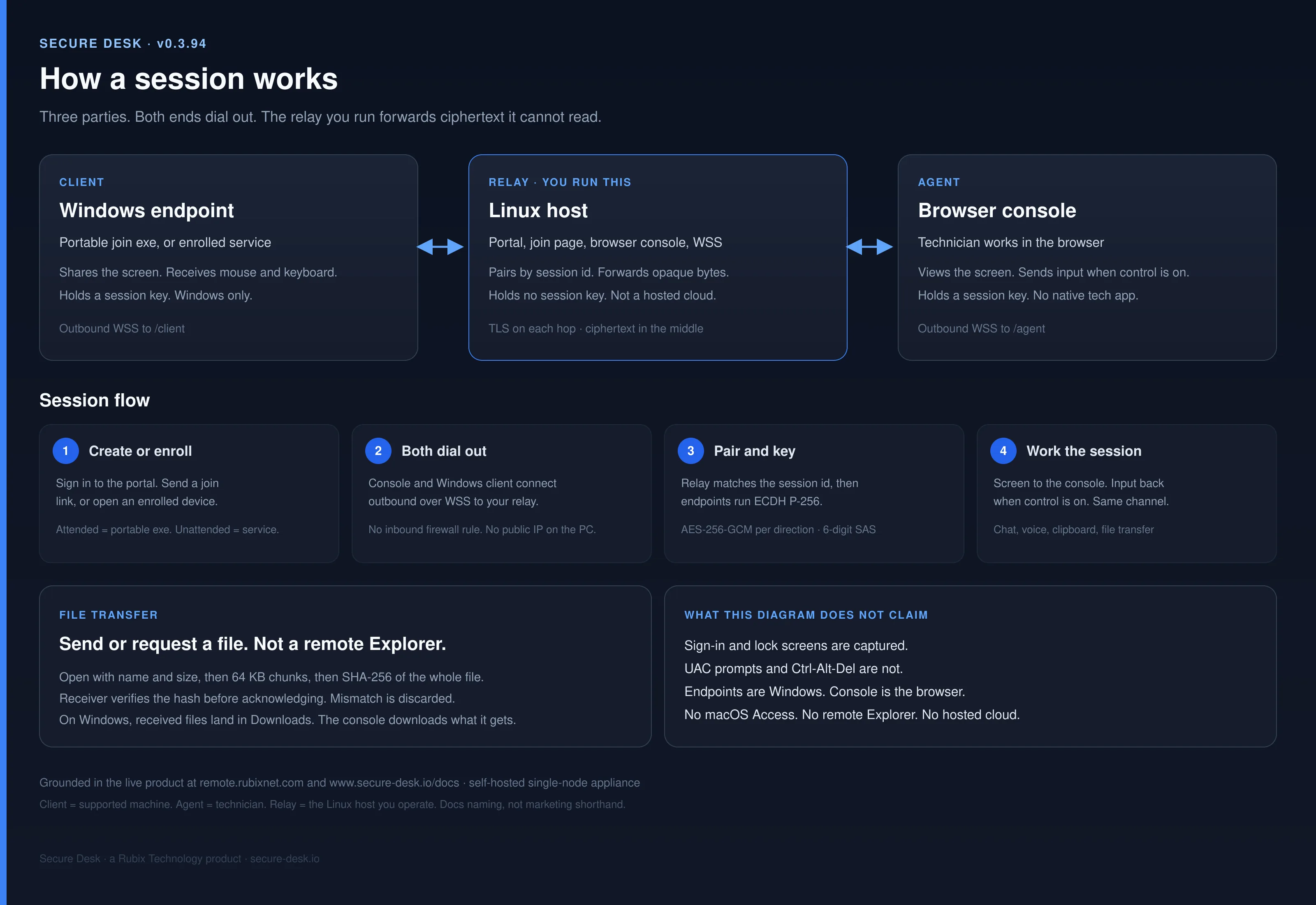
How Secure Desk works — Windows Client shares; Agent views in the browser
The Windows Client shares the screen. The Agent (technician) views and controls in a browser console. Both ends dial out to the relay you run. The relay never gets a key. Same pipe for web VDI, AI-agent desktops, and remote support — not a meeting product, not Meet/Zoom/Adobe collab share.
Who shares, who views
Product vocabulary matches the docs. The Client is the Windows machine receiving support — it captures and shares its desktop and receives input. The Agent is the support technician — they open the console in a browser, view the stream, and send mouse and keyboard when Control is gated on. The Relay is your server; it pairs them and forwards ciphertext. This is not Google Meet, Zoom, Teams, or Adobe collaboration screen share. There is no meeting room and no guest gallery.
Both ends dial out; relay still needs 80/443
The user runs the portable client — or the enrolled Access service is already up. The console opens in a browser. Each side connects outbound over WSS and presents the session id plus its token. Neither endpoint needs a public IP or an inbound firewall rule on the machines you reach. The relay you host still needs ports 80/443 (TLS and WSS). Unqualified “zero inbound ports” is wrong for the relay host.
A 6-digit SAS
Both ends derive the same short authentication string from the agreed key material. Read it aloud. A relay that tampered with the exchange is exposed immediately.
ECDH, then the relay forwards ciphertext
End-to-end encryption is required (requireE2e). The two endpoints run an ECDH exchange through the relay and derive their own AES-256-GCM keys. Compare the 6-digit code, then view the screen, take mouse and keyboard (when Control is on), open a SYSTEM shell, move files, or start a voice call. Compromise the relay and you get pairing metadata and ciphertext, not screens or keystrokes. Quality presets top out at 15 / 12 / 8 fps, not 60. If recording is used, it is a technician-local WebM from the console — not server-side.
Access is not RDP; Control defaults off
Access is Secure Desk's own session pipe — not Windows RDP or RDS. Control (attended input) defaults off until you gate it on. File transfer either direction is SHA-256 verified — not a remote Explorer. Sign-in and lock-screen capture yes; UAC and Ctrl-Alt-Del (CAD) no.
Windows endpoints; Linux is the relay host
Shipping endpoints are Windows only — portable attended executable or installed Access service. Linux is the relay and portal host in the docs, not an endpoint OS. The browser is the Agent console only. There is no macOS or Linux Access client as a shipping product, and we do not claim remote desktop that “works on any OS.”
Free Starter caps
Free keyword means free Starter only: 1 operator, 1 concurrent session, 3 enrolled Windows devices, self-hosted relay — not unlimited free SaaS. Unlicensed installs run as Starter. Hub prices: Starter free · Team $249/yr · Business $499/yr. There is no hosted multi-tenant Desk cloud.
Web VDI, not a vendor control plane
That path is web VDI: persistent Windows desktops in the browser through a relay you operate. It is not Azure Virtual Desktop, Citrix or Omnissa. No published app stacks. No GPU pools. Support is one use case on the same pipe.
AI-agent desktops
Many agents, each with its own Windows desktop, on one relay you run. Enrol each desktop once. Sessions are isolated. Backstage opens a SYSTEM shell without taking the agent's screen. No inbound RDP to the agent subnet. Secure Desk does not run the agents; it is how you reach them. That page is AI-agent desktops.
Screen-share keepers: self-hosted screen sharing · self-hosted remote support · Get a free license · security model.