 Secure Desk
Secure Remote Sessions
Keep your connections private and your information protected with end-to-end encryption.
Securely access, manage, and support Windows devices from anywhere. Give your IT team the tools they need to resolve issues faster, keep employees productive, and stay in control.
Free Starter license available — no credit card required.
WHY SECURE DESK?
EVERYTHING YOU NEED, ALL IN ONE PLACE
From helping an employee with a quick fix to managing devices across multiple locations, Secure Desk gives you the tools to keep everyone connected, supported, and productive.
Keep your connections private and your information protected with end-to-end encryption.
Connect to your enrolled computers whenever you need to, even when no one is there.
Send a link and connect with someone who needs help. No complicated setup required.
Move files between connected devices securely, without switching tools.
Speak directly with the person you're helping without needing another app.
Give team members the right level of access and keep your devices protected.
A simple six-digit code helps you confirm you're connected to the right device.
Run maintenance and troubleshooting tasks without interrupting someone's work.
Connect to computers at the sign-in or lock screen, even before someone logs in.
Use administrator access when needed while keeping credentials protected.
Personalize the support experience with your company's name, logo, and branding.
Keep your remote support software current without visiting each computer.
HOW IT WORKS
Helping your team shouldn't be complicated. With Secure Desk, you can connect to devices, solve problems, and get everyone back to work — all from your browser.
Choose a device or send a quick support link to someone who needs help.
Establish a protected connection and access the device directly from your browser.
Troubleshoot issues, transfer files, and help your team get back to what matters.
SIMPLE. SECURE. RELIABLE.
Whether you're helping someone across the office or across the country, Secure Desk gives you the freedom to provide support without being there in person.
TAKE A LOOK INSIDE SECURE DESK
Stay connected to your team, manage your devices, and provide support — all from one easy-to-use platform.
YOUR SUPPORT HUB
No more jumping between different tools. See your devices, manage support requests, and connect with your team from one central dashboard.
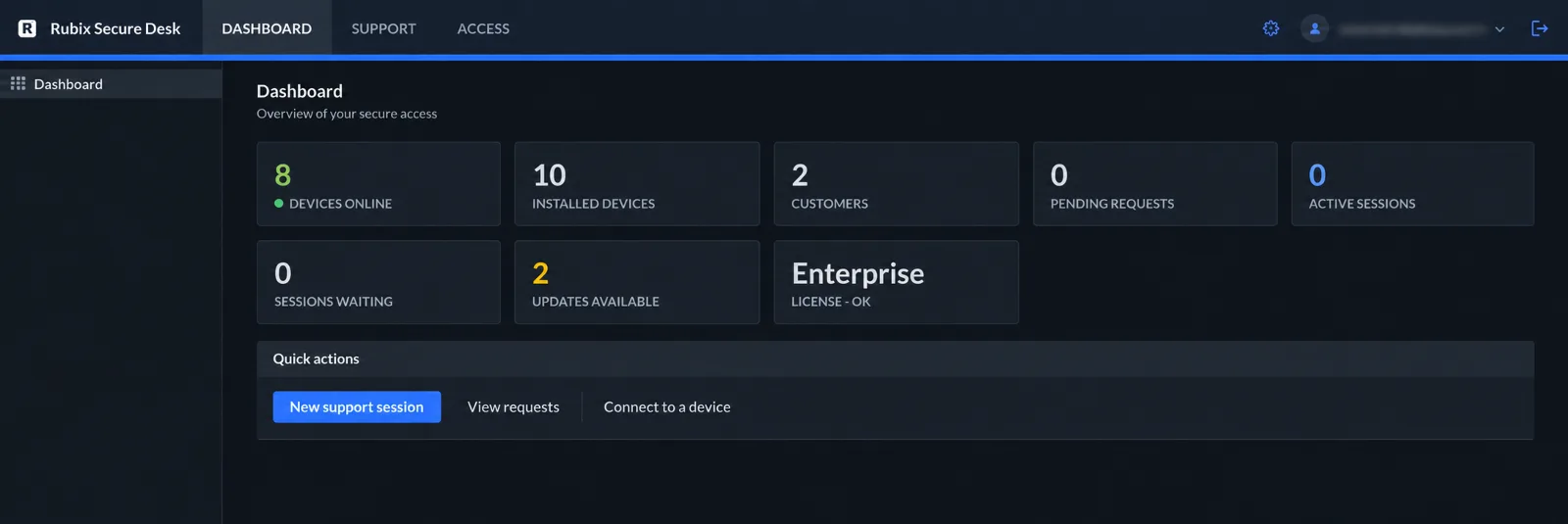
See your connected devices, support requests, and team activity in one convenient place.
Send a join link and connect with the person who needs help — no complicated setup required.
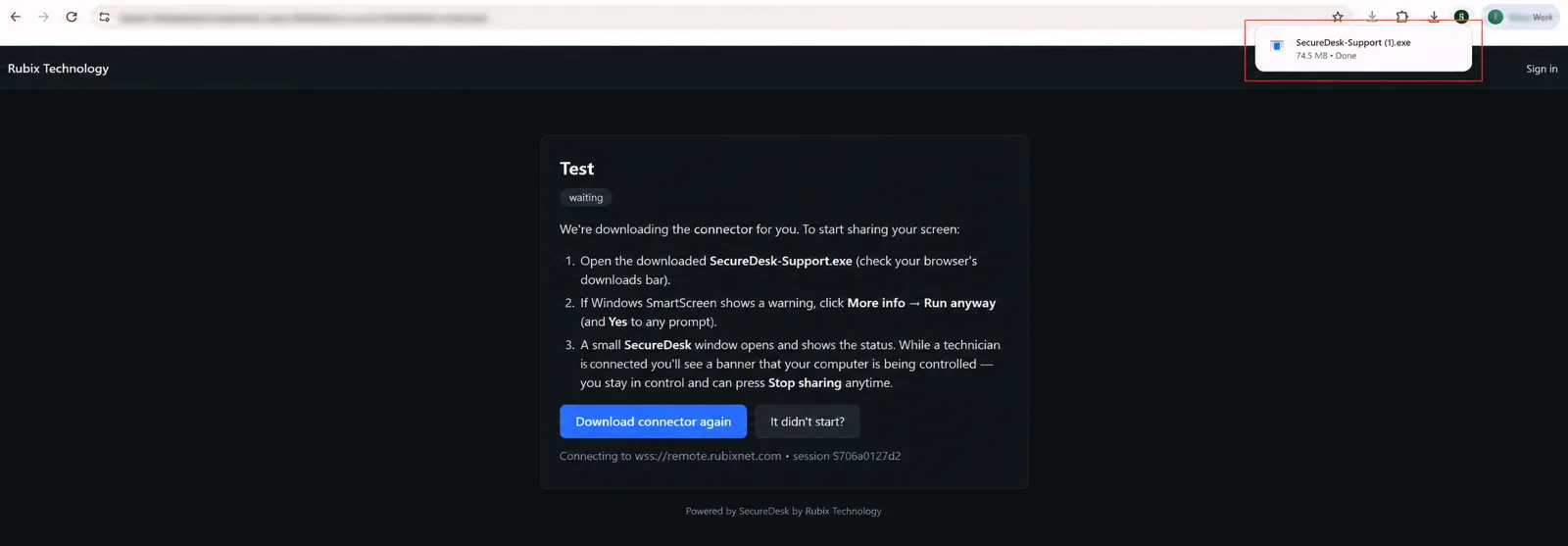
Chat, transfer files, and troubleshoot directly from the technician console.

Discover a simpler way to connect, manage devices, and provide remote support.
Get Started for FreeWHO WE HELP
From everyday IT support to managing devices across multiple locations, Secure Desk helps your team stay connected, solve problems faster, and keep your business moving.
Give your team secure access to their Windows computers from wherever they work.
Keep an eye on automated processes and step in remotely when something needs attention.
Support multiple customers, manage their devices, and deliver a seamless support experience under your own brand.
Help employees, troubleshoot devices, and resolve issues without leaving your desk.
Protect sensitive information with encrypted connections and greater control over remote access.
Access servers and unattended devices to troubleshoot problems, perform maintenance, and keep systems running.
Discover a simpler, more secure way to support your people and manage your devices.
Get Started for FreeAI-POWERED WORKSTATIONS
Give every AI agent its own workspace while keeping your team connected and in control. Monitor activity, step in when needed, and manage everything securely from one place.
Keep your agents working independently while giving your team the visibility and tools to support them whenever needed.
Give each AI agent its own Windows desktop so it can work independently without interrupting other agents.
View your agents' desktops in real time and stay informed about what they're working on.
Troubleshoot issues and make adjustments without interrupting your agent's work.
Securely retrieve screenshots, reports, and other files from your agents' workstations.
Connect to AI workstations securely without opening inbound access to your network.
Keep your agents' sessions protected with end-to-end encryption and controlled access.
Give your team the visibility, security, and control they need to support every AI agent.
Get Started for FreeFLEXIBLE LICENSING
One annual license for your whole deployment — not per technician.
For trying Secure Desk with a small team.
For growing IT teams supporting more devices.
For larger deployments across your organization.
SECURITY YOU CAN COUNT ON
Your business deserves remote support you can trust. Secure Desk helps protect your connections, keeps sensitive information private, and gives you greater control over your remote support environment.
Your remote sessions are end-to-end encrypted, helping keep your screens, files, and information private.
Give your team the access they need while keeping control over who can connect to your devices.
Administrator credentials stay on the device you're supporting, rather than being stored in your support portal.
Protect sensitive information with secure connections and a remote support environment you control.
Your support sessions stay protected while you remain in control of your connection infrastructure.
End-to-end encrypted remote sessions
BUILT AROUND YOUR BUSINESS
Take control of your remote support environment with Secure Desk. Host your own relay, manage your connections, and support your team with a solution built around your business.
Host your own relay and manage your remote support environment.
Your relay connects devices without accessing the contents of encrypted sessions.
Choose a deployment option that works with your existing IT environment.
FLEXIBLE SETUP OPTIONS
Secure Desk offers flexible deployment options so your IT team can choose the approach that fits your environment.
Set up Secure Desk on your own Debian or Ubuntu server with a streamlined installation process.
Prefer working with containers? Deploy Secure Desk using Docker Compose and manage it within your existing infrastructure.
Give your team the freedom to work from anywhere while keeping your remote support environment under your control.
Explore Secure Desk with a free starter license.